 admin
admin A church service can involve many different types of visual information. Worship lyrics need to be displayed clearly, Bible verses have to appear at the right moment, announcements may need to be shown between parts of the service, and sermons can include Scripture references, images, or videos. When all of these elements are handled separately, preparing a presentation can take a significant amount of time.
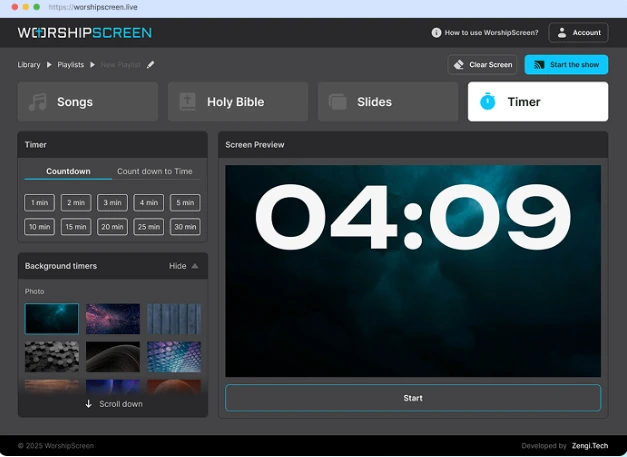
WorshipScreen is designed to make this process simpler. It is a browser-based church presentation platform that allows churches to prepare and display worship songs, Bible verses, sermon materials, images, videos, announcements, and other visual content from one place.
The software can be used by churches with different technical setups, from a small congregation using a laptop and projector to a larger church with several displays. Because WorshipScreen is available as a free tool, it can also be useful for churches that need professional-looking presentations without investing in expensive presentation software.
What Is WorshipScreen?
WorshipScreen is a church presentation solution focused on the practical requirements of a worship service. Instead of treating songs, Scripture, and media as completely separate presentation projects, the platform allows them to be organized into a single service playlist.
The basic idea is simple: prepare the content before the service, arrange it in the correct order, connect the presentation to a screen, and control the material as the service progresses.
The platform can be accessed through a web browser, which removes the need for a complicated software installation. This is particularly convenient for churches where different volunteers may be responsible for presentations from week to week.
A church can create a collection of frequently used worship songs, prepare Bible passages for upcoming sermons, upload visual materials, and then combine everything into a playlist for a particular event.
Why Churches Need Presentation Software
A projector or television alone does not make a church presentation effective. The information shown on the screen has to be synchronized with what is happening in the room.
During worship, people need to see lyrics at the right time. During a sermon, Scripture should appear when the pastor refers to it. During announcements, important information needs to remain visible long enough for people to read it.
Without a dedicated system, an operator may need to switch between text documents, presentation files, websites, video players, and image folders. This creates unnecessary complexity.
A unified church presentation platform reduces the number of tools involved. Instead of asking, “Which application contains this verse?” or “Where is the video for this announcement?”, the operator can work from an organized service playlist.
Getting Started With WorshipScreen
The first stage is to access WorshipScreen through a browser and create an account. Once inside the platform, the church can begin preparing the materials that will be used during services.
Before creating a large number of presentations, it is useful to establish consistent visual settings. Churches can select fonts, text sizes, colors, positioning, and backgrounds according to the characteristics of their room and display.
Readability should always be the priority. A presentation viewed on a laptop may look perfectly readable but become difficult to see from the back row of a church.
For that reason, it is worth testing the presentation on the actual projector, television, or LED screen before the first live service.
Creating and Managing Worship Songs
Songs are usually one of the most frequently used elements in a church presentation. WorshipScreen allows churches to create a reusable song library rather than entering the same lyrics every week.
When a new worship song is added, the lyrics can be entered and divided into presentation slides. The material can then be reviewed and corrected before it is used in a live service.
This library becomes increasingly useful over time. If a church regularly sings the same songs, the operator does not have to recreate them for every Sunday. The existing song can simply be added to a new playlist.
It is also important to review automatically created slides. Lyrics should be divided into logical phrases so that the congregation can comfortably read and sing along. The practical WorshipScreen guide recommends keeping slides concise, with around two lines being a useful guideline for lyric presentation.
Preparing a Sunday Service Playlist
Once the songs are available, the church can prepare a playlist for a particular service.
For example, a Sunday morning playlist might include:
- Pre-service countdown
- Opening worship song
- Second worship song
- Church announcement
- Bible reading
- Additional worship song
- Sermon Scripture
- Sermon presentation materials
- Closing information
The exact order will naturally depend on the church and its service structure. The important point is that the operator can prepare the visual sequence before the congregation enters the room.
This makes the live presentation much easier to manage. Instead of searching for individual files while the service is already underway, the operator can follow the prepared sequence.
Adding Bible Verses and Scripture References
Bible verses are an essential part of many church services. WorshipScreen can be used to prepare Scripture passages in advance and display them during sermons, Bible readings, or other parts of the service.
If the pastor provides sermon notes before the service, the presentation operator can prepare the expected Bible passages beforehand. These passages can then be placed in the appropriate position within the playlist.
This is especially useful when a sermon contains several references. The operator can prepare them in the order in which they are expected to appear.
At the same time, church services are not always completely predictable. A speaker may refer to another passage during a sermon. Having the presentation system available through a browser makes it possible to adapt rather than relying entirely on a fixed presentation file.
Supporting Sermons With Visual Content
Church presentation software can do more than display Bible verses.
A sermon may include an illustration, photograph, diagram, quotation, announcement, or video. These materials can be prepared alongside Scripture so that the operator does not have to open a separate application whenever the speaker changes topics.
For example, a sermon about a particular biblical location could include a photograph or map. A teaching series could use a consistent title slide. A special church event could include a promotional video.
When these materials are prepared in advance, the presentation operator can concentrate on following the speaker rather than managing multiple programs.
Images and Backgrounds
Visual design has an important role in making church presentations comfortable to follow.
WorshipScreen supports backgrounds that can be used behind lyrics and other content. A church may choose a simple background, a photograph, a branded visual, or another image appropriate to the service.
However, decorative elements should not interfere with the text.
A beautiful photograph with strong contrast or excessive detail can make lyrics difficult to read. For worship songs, a relatively simple background and clear typography are often more practical than a visually complicated design.
Churches can also establish a consistent visual identity by using similar fonts, colors, and background styles throughout their presentations.
Videos and Online Media
Some church services include videos as part of worship, announcements, teaching, or special events.
WorshipScreen supports video content, including YouTube videos, which means that a church can incorporate online media into its service workflow.
Because online video depends on an internet connection, it is important to test every video before the service begins. The operator should check that the correct video opens, that the sound is working, and that the display is connected correctly.
A short technical check before the service can prevent interruptions during a live presentation.
Using WorshipScreen With Different Displays
Churches use a wide range of display equipment. Some have a traditional projector and projection screen, while others use large televisions or LED displays.
WorshipScreen can be incorporated into these different configurations. A common setup involves connecting a computer to the church display through HDMI and using an extended desktop. The operator sees the control interface on the computer while the congregation sees only the presentation.
This separation is useful because the operator can prepare the next item without displaying the control panel to the audience.
The presentation can also be accessed through compatible devices, making the system suitable for churches that want more flexibility in how presentations are controlled.
Using a Smartphone or Tablet
A church does not necessarily need to have the presentation operator permanently seated at a desktop computer.
Depending on the chosen setup, WorshipScreen can be controlled through a mobile device. This can be convenient for smaller churches where one person may need to perform several tasks during the service.
For example, a volunteer might control the presentation from a tablet while sitting near the worship team. Another person may use a computer connected directly to the projector or television.
The advantage of a browser-based system is that the church can adapt the workflow to its available equipment rather than redesigning the entire technical setup.
Bilingual and Multilingual Services
Many churches serve congregations where more than one language is spoken. In these situations, presentation software can help make worship and Scripture accessible to everyone.
Songs can be prepared with two languages, allowing the congregation to see the original lyrics and translation together. Bible passages can also be displayed in multiple languages where appropriate.
The main challenge is keeping multilingual slides readable. Two languages require more screen space, so font sizes and line spacing should be tested carefully.
The objective should be clear communication rather than putting as much text as possible on one slide.
Preparing for the Live Service
Good preparation is one of the most important parts of successful church presentation management.
Before the service begins, the operator should check the complete playlist. Every song should be reviewed for spelling and slide breaks. Bible references should be verified. Images and videos should be opened and tested.
The display itself should also be checked.
It is worth confirming:
- the projector or television is receiving the correct signal;
- the presentation is visible at the required resolution;
- lyrics can be read from the back of the room;
- videos have working audio;
- the internet connection is stable when online content is required;
- the playlist is arranged in the correct order;
- the countdown and transitions work as expected.
This preparation takes much less time than solving an unexpected technical problem while the congregation is waiting.
Operating the Presentation During Worship
During the live service, the presentation operator needs to follow the rhythm of what is happening rather than simply clicking through slides at fixed intervals.
For worship songs, the next lyric should appear at an appropriate moment. The operator needs to watch the worship leader and listen to the music so that the screen supports the congregation rather than distracting it.
The same principle applies to sermons. If the speaker moves to a Bible passage, the corresponding Scripture should appear when it becomes relevant.
The operator should also be prepared for changes. A worship leader may repeat a chorus, skip a verse, or return to an earlier section. A pastor may change the order of sermon points.
A good presentation system should support these changes instead of forcing the service to follow a rigid script.
Creating Professional Service Transitions
Transitions are often overlooked, but they can make a major difference to the overall presentation.
Imagine that a worship song has finished and the congregation is listening to a prayer. Leaving the final lyric on the screen can make the presentation feel unfinished.
A church can instead use a neutral background, logo, or other appropriate visual while the next section begins.
The same approach works between worship and preaching, during announcements, and when a speaker is preparing to begin.
The goal is not to create elaborate effects. The goal is to make the service visually coherent.
Who Can Use WorshipScreen?
WorshipScreen can be useful for churches of different sizes and denominations.
A small church can use it with a single laptop and projector. A growing congregation can create a larger content library and organize more detailed service playlists. Churches with multilingual services can use bilingual presentation formats.
For churches searching for free worship software, the main benefit is the combination of essential presentation functions in one browser-based platform.
It can also be used as methodist worship software for congregations that need to display hymns, worship songs, Scripture, sermon references, announcements, and multimedia content during Methodist services.
The platform’s purpose is not to prescribe a particular worship style. Instead, it provides the presentation tools that can support different service structures.
Making Weekly Preparation Easier
The first service may require more preparation because the church is learning the platform and establishing its content library. After that, the process can become much faster.
A typical weekly workflow can be:
Step 1: Review the Service Plan
Start with the order of worship, including songs, readings, announcements, sermon references, and media.
Step 2: Prepare the Songs
Select existing songs from the library or add new songs that will be used for the first time.
Step 3: Add Scripture
Prepare Bible passages and arrange them according to the sermon or service schedule.
Step 4: Add Media
Include images, videos, announcement slides, and other materials required for the service.
Step 5: Check the Design
Review fonts, backgrounds, text size, and slide breaks. Make sure the presentation remains readable.
Step 6: Test Everything
Run through the playlist on the actual church display and check video and audio playback.
Step 7: Operate the Service
During the service, follow the worship leader and speaker and advance the presentation at the appropriate moments.
This workflow creates a repeatable system that can be used every week.
A Practical Solution for Modern Church Services
The main value of WorshipScreen is not simply that it can display text on a screen. Its value comes from combining the different visual requirements of a church service into one manageable workflow.
Songs, Bible verses, sermon content, images, videos, backgrounds, announcements, and timers can all become part of the same presentation environment.
For volunteers, this can make weekly preparation easier. For